The audit log
Every change in the workspace, by whom and when, searchable and exportable; what it records, and what it never does.
What it is for
The audit log is the record of every change in the workspace: uploads, dictionary decisions, access grants, members added or deactivated, settings changed, retention actions, support sessions, and the assistant's answers. Each row says who did it, when, and to what. Rows are never edited or removed, by anyone, including DocuDriver.
The three things most people do
Search it. Filter by member, area (the part of the product that wrote the row), event, date range, or text, and search. Choosing an area narrows the event list to match.
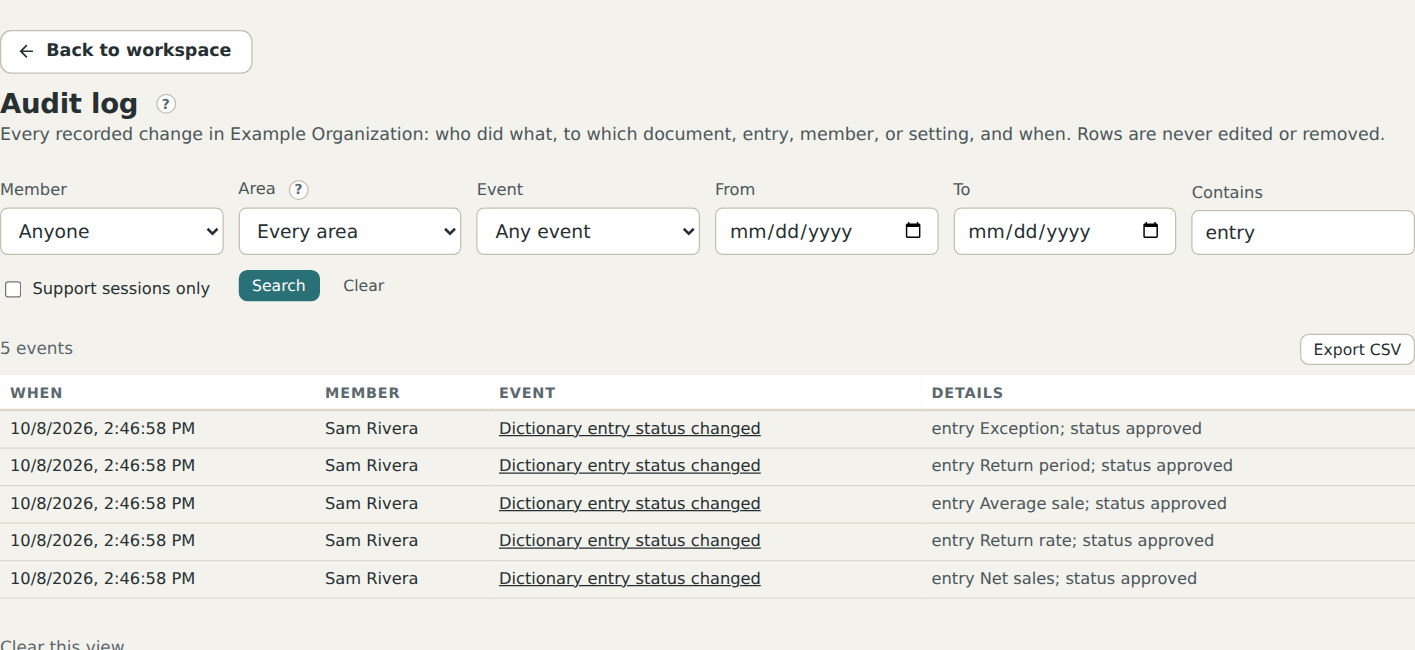
Export it. Export the current search as CSV for an auditor or a questionnaire.
Read a support session. When DocuDriver support signs in as a member to resolve a request (only with the owner's switch on), every view and change in that session is in the log under Support access, marked with the staff member's name, and the owners are mailed when it starts and ends. The Support sessions only box shows just those rows.
What it never does
An owner can clear the view (hide rows older than now from this page); nothing is deleted, DocuDriver support can still read them, and the view can be restored. The log is not pruned by retention rules and survives the deletion of anything it describes.
The one mistake to avoid
Treating the log as a place to find errors. It records what people and the product did; a page that failed to load is not in it. For that, Help and support reaches us.